Showing posts with label Goodies. Show all posts

Wednesday, August 31, 2011

Ten Icon Filters


Presenting a pack of 10 icon generators! Download it here.

Today's interfaces, both on the web and in games, contain many universally recognized symbols for items such as Facebook, Twitter, email, RSS, and so on.  But instead of using the standard icon for these services, many projects will instead use versions of the symbols that match the interface or theme of the service.  For example, a medieval game may include a Facebook icon made of stone.  This pack contains 10 filters for integrating these modern-day hieroglyphics into your interface.


Extract the pack and open the GTX files in Genetica.  The icons begin with a default "G" symbol, but are easy to edit.  Double-click the Canvas node to customize the design directly within Genetica.  Alternatively, drag an Imported Image node into the filter's input slot and select a black-and-white image of your desired design.  The following illustration shows this being done with the gold-on-wood icon in order to create a matching pair of Facebook and Twitter icons.


Enjoy!

Continue reading . . .

Thursday, July 21, 2011

Ten Cartoon Text Effects

The following pack contains 10 cartoon text effects that can be used with the seamless texture and image editor Genetica.


Here's a sampling of some of the effects included in the pack.  Download the complete pack here.
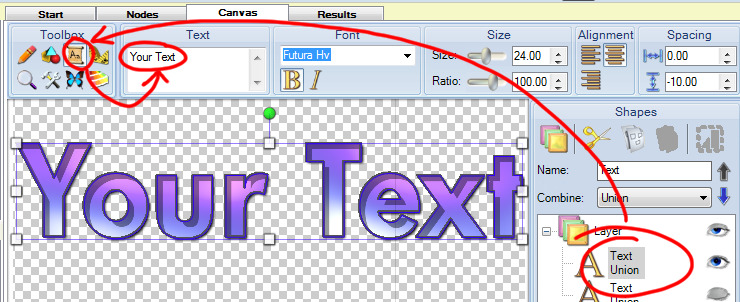
To customize the text with your own wording, use Genetica to open one of the GTX files included in the pack, then double-click the Canvas node that will appear within the workspace.  Finally, select the desired text object, select the Text tool, and type your text into the area indicated below.


Continue reading . . .

Sunday, February 6, 2011

Nine Cartoon Backdrops

Here's a new texture pack containing 9 cartoon backdrops. Download the pack here. Usage rights are described here.


Each backdrop is horizontally seamless, making it appropriate for use in side-scrolling games.


In addition to bitmap images, the backdrops are also supplied as Genetica files, allowing them to be fully customized. Genetica is available for download here.


Find out when new free resources are released by liking our Facebook page. You can also sign up for email notifications using the signup at the upper-right of this page.

Continue reading . . .

Thursday, January 6, 2011

Mystery Forest Tile Set

We're kicking off the new year with the Mystery Forest texture set, which will get you started creating platform game environments with a mysterious forest vibe.


Download the pack here.  Below is a closer look at the type of environment that can be made with the pack.


The atmospheric background can be created by layering several textures, as shown below.  Begin by tiling "Far Background.png" on a plane.  Next, "Cat's Eyes.png" can be randomly bombed above the same plane.  Layering "Near Background.png" next will cause the eyes to become partially concealed and appear to be peaking through the bushes.  Finally, a particle simulation of "Flare.png" can create the impression that fireflies or mysterious points of light are drifting through the environment.


The wall tiles have been devised with a special scheme that will allow you to create a large variety of configurations with a minimum of tiles.  Begin with a grid with squares marked NW, NE, SW, and SE, as shown below.  Within any one square, only place textures with names ending with the same code.


In addition to rendered bitmap textures, the pack also includes the original GTX files that can be opened and edited within Genetica.  Download Genetica here.

Subscribe for free to get more resources!  Use the subscription fields in the right side panel of this page.

Continue reading . . .

Sunday, November 21, 2010

Walking Paper Girl

We're giving away a character to go with last week's Paper World Texture Set!  The new pack also includes a Unity 3D game project that demonstrates how the character can be used.

Download character pack here.  To learn what's included in the pack, play the following video.


Want us to tell you when more free stuff is released?  Use the subscribe form in the right sidebar of this page!
Continue reading . . .

Saturday, November 13, 2010

Paper World Texture Set

Here's a texture set that will get you started creating environments that look like they've been mocked up from arts and crafts materials.  Download the pack here.

In addition to bitmap textures that have been rendered at a size of 512 x 512, the pack includes the original GTX files that can be opened in Genetica either for modification or for rendering at a larger size.  Download Genetica here.

The included textures can be placed on planes, boxes, and cylinders to make environments like the following.


The textures can also be used for 2D side-scrollers.


A number of the textures include opacity channels so that they can be layered on top of other textures.


Full-featured 3D environments will include decal or texture layering functionality for this purpose.  However, textures can still be layered in environments where such functionality is not present, such as Second Life.  To accomplish this, create two surfaces, one of which is slightly in front of the other one.  Then place the transparent texture on the closer surface, and the opaque texture on the farther one.

The chimney texture is intended for use on a cylinder that has end-caps removed.  If the chimney is sunk halfway into the rear wall of the environment then the smoke texture can be placed on that rear wall as shown below.


To modify any of the designs, open the GTX file in Genetica, then double-click the Canvas node to reveal the Canvas tab as indicated by the following illustration.  Once there, designs can be modified using standard drawing tools.  A tutorial demonstrating those tools can be found here.


Have you found this resource useful?  Would you like us to keep it up?  Show your support by liking our Facebook page.

Continue reading . . .

Tuesday, November 2, 2010

Free Light Strips Tile Sets

This free pack contains two sets of interlocking tiles that can be assembled to create a variety of light strips.  The original texture files are also included for creating light strip sets that match your own custom walls.

The pack and be downloaded from here, and is available for use under these terms.


Download and unpack the ZIP file to find two versions of the set.  The blue version is intended for more neutral environments, while the red version will assist in creating a more foreboding feel.


Within each of the main folders you'll find the individual files forming the set.


As shown above the contents of each set fall into three groups.  Here's a description of each:

1. Individual Tiles

This folder contains the 16 individual textures making up each set.  They can be assembled in a painting program, or they could be placed on squares or cubes and assembled in a 3D environment.


2. Combined Sets

Combined sets contain all 16 tiles packaged into a single texture.  These can be used with certain game engines, such as Torque Game Builder, as described here.

3. Genetica Files

Open the GTX files within Genetica to create custom versions of the set.  Replacing the wall with one of your own materials is easy, with Genetica automatically adding the lights and other details to it.


Many more goodies are on the way!  Use the signup towards the top-right of this page to be informed when more free items are released!

Continue reading . . .

Monday, September 27, 2010

Free Gas Tank Model and Textures


This free pack contains a model of a gas tank along with five complete texture makeovers that can be used to dress the tank up in a variety of ways.

The pack, which can be downloaded from here, can be used royalty-free in your projects with a link back to this page.


Did you like this promo video?  A tutorial 
explaining how it was created can be found here.

Once you've downloaded and unpacked the ZIP file you'll find the model in OBJ format, along with a folder for each of the five texture variations.


Within each folder you'll find the texture maps themselves, plus the original Genetica file.


All the textures included in this pack were created with Genetica.  Use Genetica to open any of the GTX files in order to modify the textures.  Genetica can be downloaded from here.


More goodies are on the way!  Use the signup towards the top-right of this page to be informed when more free items are released.

If you've appreciated this resource, you can support us by clicking the Like button on our Facebook page.

Continue reading . . .

Monday, September 6, 2010

Four Free Tile Sets

This is a great pack of four different interlocking tile sets that can be assembled in endless configurations.

The pack, which can be downloaded from here, is available for use under these terms.  Read on to see what's included in the pack.


Download and unpack the ZIP file to reveal four different versions of the set, each of which is contained in a different folder.  Enter the folder of the version you'd like to see more of.


Once you've entered one of the main folders, you'll be presented with all the files making up that set.


As shown above the contents of each set can be broken down into four sections.  Here's a description of each one:

1. Individual tiles that can be assembled by hand

This folder contains the 16 individual textures making up each set.  These can be used in a 3D environment, or pasted into a standard paint program and assembled into countless unique configurations.


2. Combined sets usable in some game engines

The combined sets have all the individual set pieces combined into a single image.  The white grid in the following illustration doesn't appear in the actual image, but was added to show how this image contains all sixteen of the individual textures.


These tile sets can then be loaded into certain game engines where they can be quickly assembled into unique arrangements.  For example, a tutorial on how tile sets are used in Torque Game Builder can be found here.


What's nice about using tile sets from a single image is that all you need to do is replace that one image and the whole setup instantly updates to the new look.


3. Standard seamless texture for floors and boxes

Standard seamless texture versions are also provided along with height and specular maps.  These will look good on floors, walls, columns, boxes, and just about anywhere else where seamless textures can be used.


4. Original files that can be modified in Genetica

All the textures included in this pack were created with Genetica.  The GTX files provided in the pack are the original files that can be opened in Genetica for full customization.  Genetica can be downloaded here.

Once one of the GTX files has been opened in Genetica, you'll find a series of nodes that represent the various components forming that texture.  Double-click either the Canvas or one of the Synthesis nodes to modify either the pattern or the materials used to create the texture.


More goodies are on the way--don't miss out.  Use the signup towards the top-right of this page to be informed when more free items are released!

Continue reading . . .